


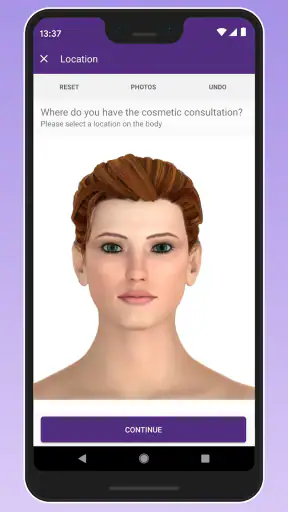
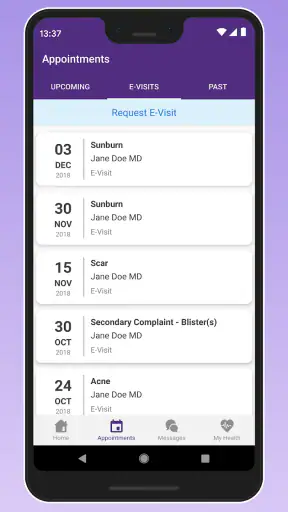
Managing healthcare should not feel like another full-time job, but it often does when appointments, messages, medication questions, and personal records are scattered across different places. APPatient is ModMed’s medical app for bringing several of those routine tasks into one mobile workflow. I found it most useful as a companion to an existing provider relationship rather than as a replacement for a clinic, a phone call, or urgent medical advice.
The basic appeal is straightforward: I can use it to update parts of my medical record, check upcoming appointments, and communicate with my provider through the app. It is free, available for Android devices running version 7.0 or later, and carries a Mature 17+ content rating. Its current version is 7.14.0 (7ed9040), and the app has grown into a widely used option, with over a million installs and an average rating of 4.0 from around eleven thousand ratings.
How APPatient fits into a normal healthcare routine
My first impression is that APPatient works best when I treat it as a preparation and follow-up tool. I would not open it expecting a complete medical encyclopedia or an independent diagnostic service. Instead, I use it before an appointment to check the schedule, during the waiting period to review information already connected to my provider, and afterward to keep communication in one place.
The starting point is the account and provider connection. That relationship matters more here than it does in many general health apps. A fitness tracker can collect information without involving a clinic, while a medication reminder can work almost entirely on its own. APPatient is different: its value depends on whether my healthcare provider uses the ModMed environment and what functions that practice makes available.
That is an important practical question to settle early. If my clinic does not support APPatient, the app cannot become a universal portal for every doctor I see. I would check with the office before spending time trying to build my whole healthcare routine around it. For someone whose provider already uses the system, however, the app can reduce the need to search through email threads, paper reminders, and old appointment cards.
In an everyday scenario, I might receive a reminder that I have an appointment later in the week. Rather than calling the office just to confirm the time, I can open the schedule in APPatient and review the information available there. Before the visit, I can look through my existing record and make a short note of questions I want to raise. Afterward, I can use the provider messaging area for a non-urgent clarification instead of relying on a separate email address.
That workflow sounds simple, but the benefit comes from repetition. I would not recommend opening the app only when something goes wrong. A quick check before an appointment and another look after the visit create a dependable habit. It also helps me notice whether a message has received a response, whether an appointment detail has changed, or whether a record needs attention.
One strength is that the app places administrative and communication tasks beside medical information. Those tasks are easy to underestimate. Confirming an appointment, checking a record, and sending a question can each take only a few minutes, yet they become frustrating when every action requires a different channel. APPatient does not remove every part of that process, but it gives supported patients a more consistent starting point.
I also appreciate that the app is not pretending to be an emergency service. A portal message is not the same as immediate clinical care. If I had severe symptoms or a time-sensitive concern, I would use the appropriate emergency or urgent-care route rather than waiting for an in-app reply. This distinction is essential, especially because the convenient messaging interface can make ordinary communication feel more immediate than it really is.
What I would check before relying on it
The first check is provider compatibility. APPatient is not a general-purpose medical wallet that automatically gathers records from every hospital, specialist, and laboratory. Its usefulness follows the connection with the participating practice. I would ask the office how they expect patients to use the app and whether messages, appointments, and record updates are all handled there.
The second check is the kind of information I actually need. If my main goal is tracking steps, sleep, exercise, or nutrition, this is not the right category of app. A dedicated health tracker will usually offer more detailed personal monitoring. APPatient makes more sense when my priority is interacting with a medical practice and keeping provider-related tasks organized.
The third check is device support. The app runs on Android 7.0 and later, which covers many older devices, but anyone using an especially old phone should still verify compatibility before making it part of a time-sensitive routine. I would also keep the app updated when practical, particularly for a medical tool where account access and communication matter more than novelty.
Privacy and access habits deserve attention as well. I would use a screen lock on the phone, avoid leaving the account open on a shared device, and be careful when reading or sending messages in public. Those are not APPatient-specific promises or settings I would assume automatically; they are sensible habits whenever an app contains personal medical information.
Settings and habits that make the app easier to use
Experienced use starts with reducing avoidable friction. I would make sure my profile information is current, especially details that could affect how the practice identifies or contacts me. When an app is used for records and appointments, a small mismatch in personal information can create more trouble than it would in a casual social app.
I would also review notification behavior instead of accepting every alert without thought. Notifications are useful when they help me notice an appointment or a provider response, but too many alerts can make important messages blend into ordinary phone activity. My preferred approach is to keep alerts that support time-sensitive awareness and silence anything that feels repetitive, while still checking the app directly before an appointment.
A useful habit is to open the relevant conversation before writing a new message. That lets me see whether the provider has already replied and helps prevent duplicate questions. I would keep each message focused on one issue, include the context the office needs, and avoid treating the message box like a live chat. Clear, compact communication is more likely to produce a useful response than a long stream of separate updates.
For records, I would read slowly and compare the information with what I remember from recent visits. The app can make information easier to access, but easy access does not guarantee that every entry is complete or current. If something looks wrong, I would contact the practice through the appropriate channel and ask for clarification rather than editing or interpreting it casually.
Another practical setting-related habit is checking how the app behaves on the phone I actually use. Display size, keyboard behavior, notification previews, and battery restrictions can all affect a medical workflow. I would test a message draft, appointment view, and record screen before I need them urgently. This small trial is more valuable than assuming the default phone configuration will be comfortable.
Because APPatient is free, cost is not the barrier I would focus on. The more meaningful trade-off is dependence on the provider’s setup. A free portal is useful only when the clinic maintains it and responds through it. If the office rarely uses digital messages, I might still keep the app for appointment information while treating phone contact as the more reliable route for certain questions.
Faster patterns for repeat users
Once the basic workflow is familiar, I would organize my use around moments rather than random browsing. Before an appointment, I would check the date and time, review available information, and prepare questions. After the visit, I would look at any new information and send one concise follow-up message if needed. Between visits, I would avoid repeatedly refreshing the app without a reason.
This approach turns APPatient into a simple three-stage routine: prepare, attend, and follow up. The advantage is not a hidden shortcut; it is the reduction of decision-making. I know why I am opening the app, what I need to check, and when I can close it. That is especially helpful for people who manage several appointments or who become overwhelmed by medical administration.
I would keep a separate personal list of questions before opening the app, then use the provider message area only for questions that belong with the clinic. This prevents the message thread from becoming a replacement for personal notes. It also helps distinguish a question that needs a professional answer from a reminder I can handle myself.
For families or people helping another adult, I would be careful about assuming that one login should cover everyone. Medical information is personal, and access arrangements should follow the provider’s process. If I were assisting a relative, I would ask the practice how they want authorized communication handled rather than sharing credentials informally.
Another efficient pattern is to use the appointment view as the anchor for preparation. Instead of searching through old emails, I would start with the next scheduled visit and work backward: what do I need to remember, what information might the provider need, and what question should be sent ahead of time? This makes the app more useful than simply checking a calendar entry.
Message timing also matters. I would send non-urgent questions during reasonable office hours when possible and allow the practice time to respond. APPatient can make communication more convenient, but it cannot guarantee instant attention. The app is faster than a paper note in some situations, yet it is still part of a clinic’s workflow, not a direct line to a clinician at every moment.
For people who dislike phone calls, this may be one of the strongest reasons to use it. Writing a clear message can be easier than explaining a question verbally while trying to remember dates and details. On the other hand, if the issue is complicated, emotional, or difficult to describe in text, a phone or in-person conversation may be better. Convenience should not dictate the communication method when clarity is more important.
Where the app reaches its limits
The biggest limitation is that APPatient cannot make an unsupported provider participate. A polished patient portal still depends on the clinic’s records, scheduling practices, and response habits. If information is missing or a message sits unanswered, the problem may be outside the app itself, but the user still experiences the friction.
I would also avoid treating the app as a complete personal health record. It can be a useful window into information connected with a provider, but my healthcare may involve multiple practices, pharmacies, urgent-care visits, and documents that do not appear in one place. People with complex care arrangements may need an additional system for keeping their own comprehensive notes.
That is where a general document organizer, a secure personal note system, or a provider-specific portal may complement APPatient. I would not replace the app automatically; I would use the alternative for the gap it actually fills. APPatient is strongest for practice communication and appointment-related tasks, while a separate system may be better for a broader cross-provider overview.
The app is also not the best choice for continuous self-monitoring. Someone looking for detailed glucose trends, workout analysis, sleep graphs, or medication alarms should choose a tool designed around those functions. APPatient may sit alongside those apps, but it should not be judged as though it were a wearable companion or a symptom tracker.
There is a learning curve for people who rarely use patient portals. Terms, record sections, and message expectations may not be obvious on the first visit. I would recommend exploring the app when I have time, not five minutes before leaving for an appointment. If an older family member struggles with mobile interfaces, helping them establish the account and understand the boundaries of messaging could make the experience much less stressful.
The Mature 17+ rating is another reminder that this is an adult healthcare tool, not a casual family app. The rating does not change the usefulness of the appointment and messaging workflow, but it does make sense to handle access thoughtfully when a phone is shared with younger users.
Compared with calling a clinic, APPatient offers a written trail and avoids waiting on hold for routine matters. Compared with email, it places communication closer to the provider’s patient workflow and keeps the subject tied to the healthcare relationship. Compared with paper records, it is more convenient for information that the practice makes available digitally. Yet the phone remains better for urgent or complicated matters, email may be more familiar to some offices, and paper can still be useful when I need a portable record across unrelated providers.
My verdict after building a repeatable workflow
I see APPatient as a practical medical companion for patients whose provider already supports it. Its best qualities are not flashy: appointment access, record updates, and provider messaging are the kinds of tasks that become valuable through regular use. The app is free, and ModMed has kept it available across a broad range of Android devices, which lowers the entry barrier for many users.
Its rating of 4.0 suggests a generally positive experience without implying that every clinic or phone setup will feel equally smooth. That matches my view. The app can simplify everyday administration, but the quality of the experience depends heavily on how actively the healthcare practice uses the underlying system.
I would recommend it to someone who wants fewer phone calls, prefers written provider communication, and has a participating clinic. I would also recommend it to anyone who tends to lose appointment details or forget follow-up questions, because a repeatable prepare-and-follow-up routine gives the app a clear purpose.
I would skip it as a primary solution if I need a complete record from many unrelated providers, advanced health tracking, emergency guidance, or instant clinical answers. In those cases, a broader personal record system, a specialized health app, or direct medical care would be more appropriate.
For everyone else, the best way to judge APPatient is not by opening it once and browsing around. Connect it through the provider’s process, check the appointment workflow, review notification behavior, send only appropriate non-urgent messages, and make a habit of checking information before and after visits. The real advantage is a calmer, repeatable healthcare routine rather than a collection of impressive extras.
After using it with that expectation, I find APPatient worthwhile for supported patients who want a straightforward bridge to their medical practice. It does not replace professional care or every other health tool, but within its intended role, it can make ordinary healthcare administration easier to manage.


